Projects & workflow
Accounting workflow & engagement management software
Generic task boards force you to bend software cards into tax engagements. In CPA Relay, a project is an actual engagement—complete with a tax year, engagement type, 6 clear status stages, assigned project leads, and strict visual separation between client-shared and firm-only work.
Built for 1040s, Business returns, Bookkeeping, Advisory, Payroll & Estate work
Six clear stages
Know where every engagement stands without building complex pipelines
You don't need 40 hours of conditional pipeline engineering to know who has the ball. Every project moves freely across six plain-English stages—and you can filter your firm's Projects list by tax year, engagement type, lead, or client as you type.
- Six stages that match real accounting: Intake, Waiting on client, In progress, In review, Waiting on signature, and Done.
- Project Leads & Team scoping: Crowned project leads manage client access and billing; staff can be scoped to see only the projects they work on or every project in the firm.
- Personal bottom bar everywhere: Every staff member has one-click access to My Tasks, My Bookmarks, My Activity, My Notes, and My Time along the bottom of every screen.
Amber vs. Sky visibility
Client collaboration and private firm work side by side
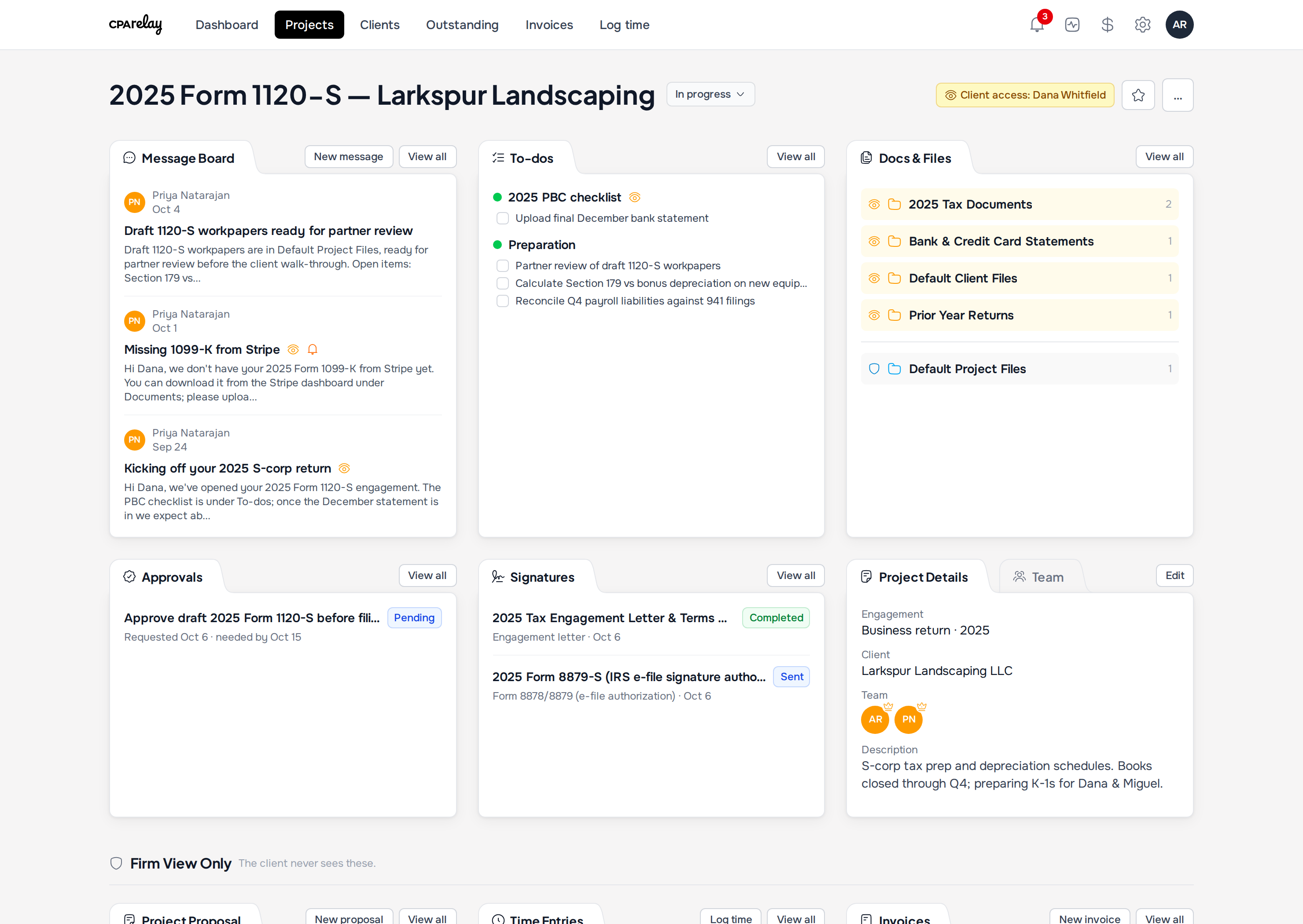
Inside a project, your team and your client work in the same place without ever crossing wires. Amber badges with an eye icon mean the client can see it; Sky blue badges with a shield mean it is locked to your firm.
- Message Board: Post internal team threads (private by default) or share announcements with the client. Unanswered client posts light up an orange Awaiting your reply bell.
- To-dos: Create shared client PBC checklists alongside private internal prep and partner review lists.
- Docs & Files: Keep shared client upload folders (amber) right above your internal working paper folders (sky blue).
- Firm View Only row: Project proposals, time entries, write-downs, and draft invoices sit in a dedicated firm-only zone at the bottom of the project.
One-click annual roll-forward
Start next year's engagement in three seconds
When January hits, don't rebuild your client projects by hand. Click Roll forward on last year's project and CPA Relay creates the new tax year's engagement automatically.
- Automatically increments the tax year in both the project title and the Tax Year field (e.g., 2025 Form 1040 becomes 2026 Form 1040).
- Carries over the client, project team, leads, folders, and to-do lists (re-opening tasks for the new year).
- Leaves last year's uploaded PDFs, signatures, and invoices safely archived in the prior-year project.
Related guides & comparisons
Workflow strategies for growing firms
Practitioner Guide
Practice Management for Small CPA Firms
Why most enterprise suites overwhelm small firms and how to structure calm tax-year workflows.
Read evaluation guideComparison
Spreadsheets & Email
Why tracking client tax files in shared workbooks breaks down and how a single triage view fixes it.
Compare workflowsComparison
CPA Relay vs. TaxDome
Why small firms choose focused project management over complex 40-hour enterprise setups.
Compare suitesRun every engagement from one organized page
Request an invitation for your practice and we'll set up your firm's dedicated web address.
$55 per seat, everything included · Unlimited free client logins